PAN Card Photo Size: Dimensions, KB & Signature Rules
28 Oct 2026 · 6 min read · JobCareerUpdates Blog
If you search for PAN card photo size, you will find at least five different answers, all stated with total confidence. Here is the one that comes from Protean's own guidelines page, read on 28 October 2026: the online-upload photo is 3.5 × 2.5 cm, scanned at 200 DPI, JPEG, max 20 KB — and the signature is 2 × 4.5 cm, 200 DPI, JPEG, max 10 KB. The paper form is a different story, and it changed recently. This guide separates the two routes, shows you the pixel numbers worked out from the official figures, and names the one piece of advice most guides get wrong.
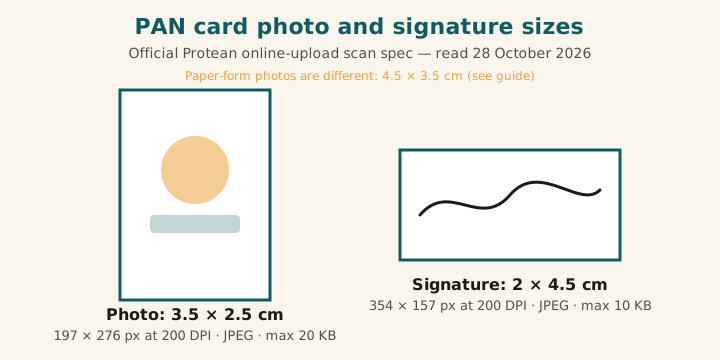
PAN card photo and signature size: the official online-upload spec
This table is copied from Protean's guidelines for filling a PAN new application — the page written for Form 93/94 under the Income-tax Rules, 2026. It is the only spec in this guide that comes from the portal operator itself, and it is the one your upload will actually be checked against.
| Item | Photo | Signature |
|---|---|---|
| Size (physical) | 3.5 × 2.5 cm (portrait — taller than wide) | 2 × 4.5 cm (landscape — wider than tall) |
| Resolution | 200 DPI | 200 DPI |
| Colour | Colour | Colour scan |
| File format | JPEG | JPEG |
| File size limit | Max 20 KB | Max 10 KB |
The same official table covers your supporting documents too: proof of identity, address, and date of birth scan at 200 DPI, in black and white, as PDF/A or JPEG, at max 300 KB per page. And read the two KB ceilings twice, because they are the whole point of this guide: 20 KB for the photo, 10 KB for the signature. Nearly every third-party PAN guide on the internet says "under 50 KB" for both. A 40 KB photo passes those guides and fails the portal. Trust the operator's table, not the roundup.
The pixel sizes, worked out from the official cm and DPI
Protean's table gives centimetres and DPI, not pixels. The pixel counts follow by plain arithmetic — centimetres ÷ 2.54 × DPI — and they are labelled here as worked-out numbers, not as a second official rule. Portals check the shape, the DPI tag, and the file weight, so those three are what you need to get right.
| File | Worked-out pixels (width × height) | How it is worked out |
|---|---|---|
| Photo | 197 × 276 px | 2.5 cm ÷ 2.54 × 200 DPI wide; 3.5 cm ÷ 2.54 × 200 DPI tall |
| Signature | 354 × 157 px | 4.5 cm ÷ 2.54 × 200 DPI wide; 2 cm ÷ 2.54 × 200 DPI tall |
One practical note on DPI: a photo straight from a phone camera usually carries a 72 DPI tag. The Protean table asks for 200 DPI, so export the file at 200 DPI rather than uploading the phone original and hoping the portal ignores the tag. If a tool you use only asks for pixels, set the pixels above and then check the file's DPI tag before uploading — the shape alone is not enough.
Paper form photos are a different size now: 4.5 × 3.5 cm
This is where the confusion comes from, and it is genuine — even Protean's own pages are mid-transition. Under the Income-tax Rules, 2026, the old Form 49A was replaced by Form 93 for Indian citizens, and the paper form's photos grew. Protean's current correction instructions say applicants should affix two recent colour photographs with a white background, size 4.5 cm × 3.5 cm. Meanwhile, Protean's older FAQ page still carries the old 3.5 × 2.5 cm wording. Both pages are live right now, so a search returns both numbers and both look official.
The way through it is simple: follow the boxes printed on your own form. If your printed form's photo spaces are 4.5 × 3.5 cm, paste 4.5 × 3.5 cm prints. If you are uploading online, use the scan spec in the first table. And the paper-form handling rules, from the same instructions, still apply whichever size your form shows: two photos, do not staple or clip them, sign across the photo on the left so part of the signature sits on the photo and part on the form, leave the right photo completely unmarked, and keep the signature inside its box. A thumb impression used instead of a signature must be attested by a Magistrate, Notary, Oath Commissioner, or Gazetted Officer under seal and stamp.
Why this guide quotes no UTIITSL number
You apply through Protean or UTIITSL, and the two portals publish their own upload limits. For Protean, the limits are on a public guidelines page, quoted above. For UTIITSL, no upload spec could be verified on an official UTIITSL page during this check — and the third-party sites that claim one disagree with each other on every number: the photo as 213 × 213 pixels at 300 DPI under 30 KB on one site and under 50 KB on another, and the signature at 200, 300, or 600 DPI with ceilings of 10, 50, or 60 KB depending on which page you open. Publishing any one of those as "the UTIITSL spec" would be guessing, and this site does not guess specs. If you apply through UTIITSL, open its application, read the note beside the upload field, and match that note exactly — it outranks every guide, including this one. When a UTIITSL figure is verified officially, this post will be updated in place with it.
How to make your PAN photo and signature files
Work in this order, and check each file before you upload it:
- Take the photo right. Recent, colour, front-facing, plain white background, both eyes open, neutral expression, face fully visible. A white wall in soft daylight does the job — no studio needed, and no filters or edits on the face.
- Crop the photo to the frame. Portrait, 3.5 × 2.5 cm — in pixels, 197 × 276 at 200 DPI. Our photo resizer's Custom mode takes a width and height in pixels, so 197 × 276 goes in directly. Export at 200 DPI.
- Land the photo under 20 KB. Run it through our exact-20 KB compressor and check the result is genuinely under the ceiling — "about 20 KB" is not under 20 KB.
- Sign on plain white paper with a dark pen. Keep it inside the shape: landscape, 2 × 4.5 cm, which is 354 × 157 pixels at 200 DPI. Scan or photograph it in good light with no shadow across the strokes.
- Land the signature under 10 KB. This is the tighter ceiling and the one people miss. Use our exact-10 KB compressor and zoom in afterwards — if the strokes have gone faint or broken, re-scan at better light rather than squeezing a bad scan harder.
- Check before you submit. Photo: portrait shape, 200 DPI tag, JPEG, under 20 KB. Signature: landscape shape, 200 DPI tag, JPEG, under 10 KB. Supporting documents: 200 DPI, black and white, under 300 KB per page. Two minutes here beats a rejection letter and a second round of fees and waiting.
Why PAN uploads get rejected
Every reason below traces to a rule in the official tables above, not to guesswork:
Over the KB ceiling. The classic one. A photo at 35 KB or a signature at 25 KB feels small, and every "under 50 KB" guide calls it fine — but the Protean ceilings are 20 KB and 10 KB. Compress to the portal's numbers.
Wrong DPI tag. A phone original at 72 DPI uploaded unchanged. The table says 200 DPI; export at 200 DPI.
Photo and signature shapes swapped. The photo is portrait (taller than wide) and the signature is landscape (wider than tall). Mixing those two up is a surprisingly common rejection, because both files are small rectangles and both get made in the same sitting.
Wrong size for the wrong route. Pasting 3.5 × 2.5 cm prints on the new paper form, or blowing an online upload up to 4.5 × 3.5 cm because a search result said so. Paper and upload are different specs — use the one for your route.
Stapled, clipped, or marked photos on the paper form. Photos must be affixed, not stapled or clipped, and the right-hand photo must carry no mark at all — a signature straying onto it, a stamp, a smudge. The left photo takes the crossing signature; the right one stays clean.
Blurry or shadowed scans. A signature photographed in dim light, or a photo with a shadow behind the head, reads as a bad file no matter how correct its size is. Re-take in better light instead of compressing harder.
The same discipline behind this guide — every figure checked against the operator's own page, and no figure published that couldn't be verified — is what our 31-exam photo spec audit found missing on popular resizer sites, and it is why the UTIITSL numbers above are left out rather than guessed. The official table outranks every guide, including this one.
Sources & verification: Online-upload figures (photo 3.5 × 2.5 cm, signature 2 × 4.5 cm, both 200 DPI, JPEG, max 20 KB / 10 KB; supporting documents max 300 KB per page) are from Protean's "Guidelines for filling PAN New Application" page, read 28 October 2026. Paper-form figures (two colour photos, white background, 4.5 × 3.5 cm; signature across the left photo; thumb attestation) are from Protean's current correction instructions, read the same day. Protean's older FAQ page still shows the old 3.5 × 2.5 cm paper wording, and that conflict is stated in the guide rather than hidden. No UTIITSL figure is claimed, because none was verified on an official UTIITSL page. Pixel counts are arithmetic from the official cm and DPI figures, labelled as such. Re-check trigger: any Protean guideline revision, and the still-open UTIITSL verification.
Skip the reading — make the file now, free:
Open the Photo Resizer (Custom Size) →Frequently asked questions
What is the PAN card photo size?
For the Protean online upload, the scanned photo is 3.5 × 2.5 cm at 200 DPI, JPEG, max 20 KB. For the paper form, the pasted photos are now 4.5 × 3.5 cm. The two routes use different sizes, so use the one that matches how you are applying.
What is the PAN card signature size?
For the Protean online upload, the scanned signature is 2 × 4.5 cm at 200 DPI, JPEG, max 10 KB. Sign on plain white paper, keep the signature inside its box, and on the paper form sign across the left photo while leaving the right photo unmarked.
What are the PAN card photo dimensions in pixels?
Worked out from the official size and DPI, the photo is 197 × 276 pixels (width × height) and the signature is 354 × 157 pixels. Those pixel counts are arithmetic from 3.5 × 2.5 cm and 2 × 4.5 cm at 200 DPI, not a second official rule — the portal checks the shape, the DPI tag, and the file weight.
Is the PAN photo size 4.5 × 3.5 cm or 3.5 × 2.5 cm?
Both, for different routes. The paper form now asks for 4.5 × 3.5 cm prints, per Protean's current correction instructions. The online upload scan is 3.5 × 2.5 cm, per Protean's guidelines table. Do not enlarge your upload file to 4.5 × 3.5 cm, and do not paste 3.5 × 2.5 cm prints on the new paper form.
Why does the PAN portal reject a photo under 50 KB?
Because the official ceiling is tighter than most guides claim. Protean's guidelines table sets the photo at max 20 KB and the signature at max 10 KB. A 40 KB photo passes every "under 50 KB" guide on the internet and still fails the portal. Compress to the portal's own ceiling, not a blog's.
What is the UTIITSL PAN card photo size?
This guide does not quote one as official, because no UTIITSL figure could be verified on an official UTIITSL page, and third-party sites disagree wildly with each other — 213 × 213 pixels at 300 DPI under 30 KB on one, under 50 KB on another, and three different signature DPIs. If you apply through UTIITSL, read the note beside its own upload field and match that; it outranks every guide, including this one.